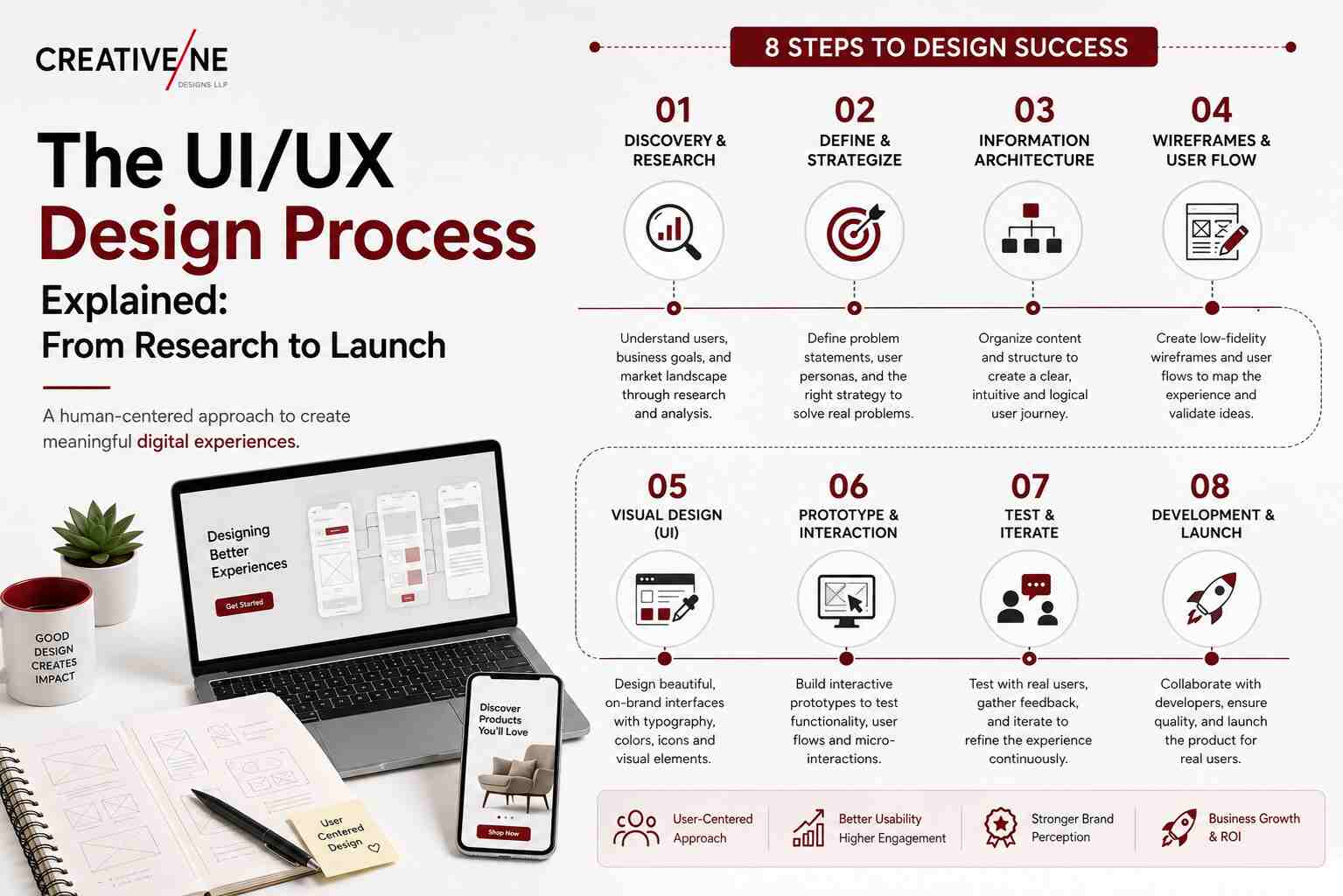
A proper UI/UX design process is the difference between a website that looks premium and one that actually produces enquiries. It happens constantly: the design is approved happily, and six months later the numbers have not moved — almost always because the process was skipped in favour of jumping straight to visuals. This post walks through all eight steps of the UI/UX design process, what you receive at each one, and where your involvement matters most.
What the UI/UX Design Process Is and Why It Exists
The UI/UX design process exists to replace opinion with evidence. Left to taste, website decisions get made by whoever is most senior in the room. With a process, they get made based on what users need to do and what actually helps them do it.
That has a commercial consequence. Websites built through a real process convert more of the traffic you are already paying for, and need fewer expensive redesigns — a link between design quality and revenue we cover in how UI/UX design improves conversion rates.
The 8 Steps of a Professional UI/UX Design Process
Step 1: Discovery and Business Goals
The team learns what the business needs from the website: enquiries, direct sales, credibility with distributors, recruitment. Different goals produce genuinely different websites. Ambiguity here guarantees rework later.
You receive: a project brief with agreed goals and success measures. Duration: 3–5 days.
Step 2: User Research and Personas
Who visits, what they are trying to accomplish, and what stops them. Methods range from customer interviews and sales-team input to competitor analysis and existing analytics.
You receive: a research summary and two or three personas. Duration: 4–7 days.
Step 3: Information Architecture and User Flows
Before any visual work, the team maps the site’s structure — pages, hierarchy, navigation — and the routes users take to complete key tasks. This is where most “confusing website” problems are quietly prevented.
You receive: a sitemap and flow diagrams. Duration: 3–5 days.
Step 4: Wireframes
Grey-box layouts of each page template showing content priority, hierarchy, and placement without any styling. Wireframes feel unglamorous to review, and they are the single most valuable stage for a client to engage with — changing a wireframe costs minutes, changing a built page costs days.
You receive: wireframes for all key templates. Duration: 5–10 days.
Step 5: Interactive Prototype
The wireframes are linked into a clickable prototype so you can walk through real journeys — landing, browsing, enquiring — before a single pixel is designed or a line of code is written.
You receive: a shareable prototype link. Duration: 2–4 days.
Step 6: Visual UI Design
Now the visual layer: typography, colour, imagery, iconography, spacing, and states (hover, error, empty, loading), assembled into a reusable design system so future pages stay consistent.
You receive: full-fidelity designs for desktop and mobile, plus a design system. Duration: 7–14 days.
Step 7: Usability Testing and Iteration
A handful of real users attempt real tasks while someone watches. Five users typically expose most of the significant problems. The design is then corrected — before development cost is committed.
You receive: findings and a revised design. Duration: 3–7 days.
Step 8: Developer Handoff and Launch Support
Organised files, specifications, assets, and documentation go to the development team, and the designers stay available through build and QA so the finished site matches the approved design.
You receive: handoff files and design QA through launch. Duration: ongoing through development.
How Long Does the UI/UX Design Process Take?
The UI/UX design process runs to different timelines depending on scope:
- Landing page or micro-site: 2–3 weeks
- Business website (8–15 pages): 4–8 weeks
- E-commerce site: 6–12 weeks
- Web application: 10 weeks and up
These are design timelines; development runs after or alongside. What speeds things up is prompt, consolidated feedback and a single decision-maker. And what slows them down is feedback arriving in fragments from five people over three weeks.
What the Client’s Role Is at Each Stage
Your input matters most at three points: the discovery brief (be honest about goals and constraints), the wireframe review (this is where structural change is cheap), and the final design approval. Between those, the most useful thing you can do is respond quickly and consolidate feedback into one voice.
A practical note: react to designs against the brief, not personal preference. “I don’t like green” is hard to act on. “Our distributors are 50+ and this text feels small” is immediately useful.
Red Flags: When an Agency Is Skipping Steps
- Visual designs arrive in week one with no research or wireframes.
- No prototype is offered — you approve static images and hope.
- Mobile designs are never shown, only promised.
- No usability testing at any stage.
- Handoff means emailing a folder of images to your developer.
Any of these should prompt a direct question about process. Our buyer’s guide to choosing a web UI/UX design company covers the full evaluation checklist.
Frequently Asked Questions
What is the difference between UI design and UX design?
UX determines how the site works — structure, flows, and whether visitors can accomplish what they came for. UI determines how it looks — typography, colour, and visual credibility. UX comes first; UI makes it appealing.
How long does the UI/UX design process take?
Four to eight weeks for a typical business website, longer for e-commerce and applications. Design timelines are separate from development.
What is a wireframe and why is it needed?
A wireframe is an unstyled layout showing content priority and placement. It lets you fix structural problems in minutes rather than after everything is designed and built.
What happens after the design is handed to developers?
The designers provide specifications and assets, then review the built pages against the approved design and flag discrepancies. Without this step, good designs routinely get implemented badly.
Process Is What Makes Results Repeatable
The UI/UX design process is what separates a website that performs from one that merely looks good — research before layout, structure before style, testing before launch. Every agency can show you an attractive portfolio; far fewer can show you the eight steps behind it.
Planning a new website or a redesign? Creativeline is a web UI/UX design company in Gandhinagar that runs this full process on every project. Talk to us about yours.
